User Interface
A
modeless properties palette allows the user to change the properties of an element during placement or modification.
Conte
xtual tab improvements reduce the number of tab switches and provide consistent tool locations.
Users now have the ability to adjust and
customize the order of tools on the Quick Access toolbar.
 Temporary Dimensions
Revit now remembers edits to temporary dimension witness lines per session. Once you tweek a temporary dimension on an object it remembers that tweek during the editing session.
 Adaptive Components
Adaptive component functionality
is designed for situations when components need to flexibly adapt to unique contextual conditions. Adaptive points are created by modifying reference points. The geometry drawn by snapping to these adaptive points results in an adaptive component.
 Form Editing
A form can be edited in sketch mode by modifying the curves from which it was created. A form can also be
dissolved back to the curves from which it was created. Once a form has been dissolved, its
profile curves and path (when applicable) remain. These curves and path can be edited
to create a new form.
The Dissolve Form command removes the surfaces from a form,
leaving the valuable defining profiles, curves and points.
 Large Team Workflow
Improve
Large Team Workflow
Improve your ability to work with projects containing
linked files with the capability to
apply view filters, tag elements, and control visibility of worksets.
 Text Improvements
Improvements to text tools enable you to:
Adjust the location of the leader relative to the text block
Format text with bullets and numbering
Modify text using the Find & Replace Text tool

Str
uctural Tools
Several structural tools, previously available only in Autodesk® Revit® Structure software, are now available to Autodesk Revit Architecture users.
These tools include:
Curved Beams
Metal Decking
Slanted Structural Columns
Trusses
Be
am Coping tool
Beam System Tags
 Enhanced Visualization
Autodesk Revit Architecture now provides the ability to
display materials and ambient lighting in editable views.
 Keyboard Shortcuts
Autodesk Revit Architecture now provides a new interface for
managing keyboard shortcuts for Revit Tools.
Add
or remove keyboard shortcuts and assign multiple shortcuts for each Revit Tool.
Import keyboard shortcuts from another user.
Export keyboard shortcuts to share them with other users, or to a spreadsheet program where you can
sort, organize, and print a list of shortcuts for quick reference.
 Custom Elevation Tags
Define the appearance of view tags used for elevations. Elevation tags can now have any shape and any number of arrows pointing in nonorthogonal directions relative to the tag body.
 Background Images in Rendered View
Autodesk Revit Architecture now provides the
ability to display images in the background of rendered views.
 Sheet Improvements
Improvements to sheets enable you to:
List sheets on the drawing list that are not in the project, such as consultant drawings
Consistently align views on sheets.
 Convert Line Types
The convert lines tool converts existing model lines, detail lines, and symbolic lines into the preferred line type.
 Repeat Last Command
Revit 2011 makes it easy to repeat the command that was last used, or select from a list of recently usedcommands
 Reporting Parameter
Let's you create a parameter that is easily usable in other families and schedules such as
reporting the wall thickness in a door or window schedule.
More Information
Key Features Common to all Revit Platform Software Autodesk® Revit® Architecture 2011, Autodesk® Revit® MEP 2011 and Autodesk® Revit® Structure 2011 software share a common set of key enhancements for improved design functionality and workflow to help design teams accelerate better design with tools that promote productivity and support sustainable design and analysis. See the Autodesk® Revit® Platform Enhancements for 2011 backgrounder for information on the platform enhancements.
Enhancements specific to Revit Architecture 2011 include:
Form Editing:
Sketch editing for conceptual masses in Revit Architecture 2011 has been improved with the
ability to edit individual profiles of any type of form without having to delete the form first, similar to “sketch mode” but even more accessible.
The
Dissolve Form command removes the surfaces from a form,
leaving the valuable defining profiles, curves and points.
In the past, only voids could be used as cutting elements for Boolean operations, and it was difficult to access them again for further transformations.
Now solids can be used to cut other solids, so that when the cut is executed, geometry from both forms remains visible.
Surface Rationalization:
The
ability to rationalize surfaces has been enhanced. Surfaces can now be split by levels, reference planes and
model lines.
Now, divided surface patterns can be made up of
any combination of UV grids and intersects created by these new elements.
Adaptive Components:
The adaptive component is a generalized
implementation of the pattern-based curtain panel family, which was introduced with the 2010 release of Autodesk Revit Architecture. It is designed to handle cases where components need to flexibly adapt to many unique contextual conditions. The adaptive component can be used to simply
fill in the empty edge panels on a divided surface or for more complex modeling or framing applications.
Structural Tools:
Several features formerly available only in Autodesk Revit Structure software are now available in Autodesk Revit Architecture, such as the ability to create:
Curved beams
Slanted columns
Beam copings
Trusses
Metal deck profiles, and more
Rendering Enhancements:
Background Images Revit Architecture now provides the ability to display images in the background of rendered views.
Procedural Textures Create custom procedural textures based on patterns such as checker, gradient, wood or tiles.
New Autodesk Material Library More smoothly exchange material data between Autodesk applications with the new Autodesk Material Library. Materials can be exchanged with certain other supporting Autodesk applications (AutoCAD®, Autodesk® Inventor®, Autodesk Revit MEP and Autodesk Revit Structure software) in a true one-to-one mapping — helping create a consistent definition and rendered look and minimize the need to rework materials after data import.
Note: The new Material Library in Revit Architecture 2011 will only export materials, lights, or environments to
3ds Max/3ds Max Design 2011.
Removal of Four-Core Rendering Limit Rendering in Revit-based products is no longer limited to the use of four cores on multiprocessor computers.
Revit-based products can now take advantage of as many cores as are available on your computer.
Access to Autodesk® Green Building Studio® Web-Based Services (Available with Subscription to Revit Architecture)
More smoothly extend BIM workflows to include sustainable analysis. With more than 1.6 million virtual weather locations across the globe, the climate information used in analyses can be more local, accurate and current.
By using the power of
cloud computing, Green Building Studio can generate analyses in a matter of minutes, thus helping architects and designers to iterate through multiple design options earlier and more often.
For new buildings projects, whole building energy analysis can help predict more accurate building operation costs before construction. For renovation and retrofit projects, the software helps users to make the most efficient design choices.




 Did you know you can edit the 'header' information in REVIT Schedules and 'Group' (or ungroup) columns as indicated above?



 So we know the Adjacent (12) and the user inputs the Opposite (Rise) but the trick is we have to use the 'Inverse Tangent' to get the actual angle in degrees. Otherwise all we get is the Tan of the angle, not the actual angle itself. So the correct term for Inverse Tan is ArcTan which REVIT accomodates as the built in operator atan.


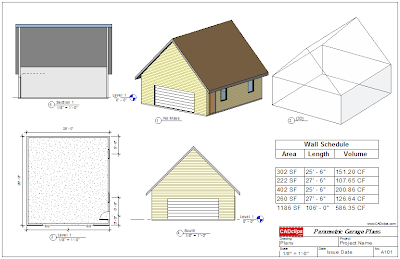 Note the Schedules as well !