
This blog is provided for All Things REVIT.
Tuesday, April 30, 2013

Tuesday, April 23, 2013
REVIT Room Calculation Point CADclip
CADclips Announces New $39 and $99 REVIT Video Training Tutorial Subscription

The CADclip video tutorial below explains the above conditions and then some.
Furniture, Casework, Specialty Equipment, Generic Models, Doors & Windows Now Have Room Calculation Points managed from within the family editor.
In REVIT 2014 that is.
Prior to 2014 these MEP categories already had room calculation points. Lights, Electricical Equipment, Mechanical Equipment & Air Terminals.
When you are in th family editor you just need to turn on the room calculation point toggle and it appears as shown below.
In order for this control to be enabled the family category has to be 'room friendly'.
Room friendly means the element 'knows' what room it is in. When this happens you can include room information when you schedule the elements or you can include these elements when you schedule the rooms. It works both ways.
Here's an image of the elements in the family editor after the room calculation point has been enabled.
In REVIT 2014 that is.
Prior to 2014 these MEP categories already had room calculation points. Lights, Electricical Equipment, Mechanical Equipment & Air Terminals.
When you are in th family editor you just need to turn on the room calculation point toggle and it appears as shown below.
In order for this control to be enabled the family category has to be 'room friendly'.
Room friendly means the element 'knows' what room it is in. When this happens you can include room information when you schedule the elements or you can include these elements when you schedule the rooms. It works both ways.
Here's an image of the elements in the family editor after the room calculation point has been enabled.

The CADclip video tutorial below explains the above conditions and then some.
Saturday, April 20, 2013

REVIT 2014 View Displacement HOLY CRAP !
CADclips Announces New $39 and $99 REVIT Video Training Tutorial Subscriptions


This New REVIT 2014 Element Displacement Tool is Sooooooo Cool I Seriously Can't Sit Still.


REVIT 2014 CADclip on Crop Regions
CADclips Announces New $39 and $99 REVIT Video Training Tutorial Subscriptions

REVIT 2014 Crop Regions R O C K !

Here's the #CADclip
Wednesday, April 17, 2013
REVIT CADclip on 3D Auto Section Box
CADclips Announces New $39 and $99 REVIT Video Training Tutorial Subscriptions

Watch the CADclip Video Below on 'Coins' Add-In 'Auto Section Box'.

Here's the CADclip Video on How to Use it and Where to Get it From
Saturday, April 13, 2013
CADclips 35 Dollar 1 Year Subscription Sale
Until April 20, 2013.
1 Year Full Site REVIT Video Training Access for a mere $35
(regularly $199)
Don't Miss Out
Full Site Download and Online Viewing Access to Over 1000 REVIT Video Tutorials
Some say "It's the Worlds Best REVIT Video Training"
With new REVIT 2014 Videos coming soon . . . . and this deal inludes EVERYTHING for 1 year.
Tuesday, March 26, 2013
REVIT 2014 Materials Dialog Box has saved the world
. . . .O . . . M . . . G
REVIT 2014 Materials Dialog box
(Code named "Thank you")

REVIT 2013 Materials Dialog BoxES
(code named "The Migrain Headache")

REVIT 2012 Materials Dialog Box
(Code named "What's not broken don't fix")

Word is the Autodesk designer of the 2013 Materials interface has been traded to the ArchiCAD programming group for a can of soup.
Monday, March 25, 2013
REVIT 2013 Materials Library Video Tutorial
$50 - 1 Year CADclips Video Training Subscription

5 Minutes to Understanding REVIT 2013 Material Libraries

Wednesday, February 27, 2013
MS Word Tutorial Heading Styles and Table Of Contents
CADclips Announces New $39 and $99 REVIT Video Training Tutorial Subscriptions
Here's a CADclip video tutorial on using Headings and Table of Contents in MS Word 2010.
Here's a CADclip video tutorial on using Headings and Table of Contents in MS Word 2010.

I enjoy doing a little writing and documentation and really like the look of an organized professional paper.
The CADclip below outlines some very simple steps to turn your basic documents into professional looking papers by using MS Word Heading Styles and the Table of Contentas (T.O.C.) tools.
Your reports and written docs will never look the same . . . Enjoy !
Friday, February 08, 2013
REVIT 2013 Video Tutorial on Yes No Parameters
CADclips Announces New $39 and $99 REVIT Video Training Tutorial Subscriptions
Use REVIT Yes - No Parameters to control the Visibility of Family Parts.
Thursday, February 07, 2013
REVIT Skinny Parameters Button PERFECT !
I have made a small but consistant living on showing people the skinny, tiny, little parameters button on the REVIT properties palette.
Stretch the palette wider and that little sucker stays exactly the same size. Thank you. When training people I usually hold back on the existance of this little beauty until the time is right. Then BAM ! I blow their minds.
Thanks autodesk . . . who ever said you don't care about us trainers.
It's our little money making secret . . . shhh . . .
d o n ' t t e l l a n y o n e .

Wednesday, February 06, 2013
REVIT Duct Place Holder Video Tutorial
CADclips Announces New $39 and $99 REVIT Video Training Tutorial Subscriptions


Here is a video on using REVIT MEP Duct Place Holders.


Tuesday, February 05, 2013
REVIT HVAC Duct Routing Video Tips
CADclips Announces New $39 and $99 REVIT Video Training Tutorial Subscriptions
Below is an image and a video tutorial of a few manual duct routing tips.
Below is an image and a video tutorial of a few manual duct routing tips.

Sunday, February 03, 2013
All REVIT Imperial Detail Families Project
Imperial Version
Below is an Imperial project file with all of the REVIT 'Detail Items' placed and organized.
Download the Imperial Project File with all of the installed Detail Families loaded and placed in a drafting view.
Here is a link to the blog post with the Metric version and a video demonstration.
Here are a few sample images of what's in the project file.


Wednesday, January 30, 2013
CADclips offers $9.99 and $19.99 Subscriptions
CADclips Announces New $39 and $99 REVIT Video Training Tutorial Subscriptions
$9.99 REVIT Introduction Subscription
CADclips now offers a $9.99 Introduction Subscription.
This series contains 104 videos for 14 Hours of Awesome REVIT training.
Purchase Here or Contact Daryl Gregoire
$19.99 REVIT Student Subscription
CADclips now offers a $19.99 Student Subscription.
For university, college and high school students.
CADclips now offers a $19.99 Student Subscription.
For university, college and high school students.
Tuesday, January 29, 2013
All REVIT Detail Families Project
Metric Version
Below is a Metric file, a video and images of all the REVIT 'Detail Items' that come installed with REVIT 2013.
Download the Metric Project File with all the Detail Families organized and placed in a drafting view.
For all my long time American friends here is a link to the Imperial version of the same thing.
Below are a few sample images and a video demonstration.
Enjoy !


Thursday, January 24, 2013
CADclips 4b Rule for Custom Families
CADclips Announces New $39 and $99 REVIT Video Training Tutorial Subscriptions
Bones, Brains, Balance and Body
Use the '4B' rule when creating a custom REVIT family from scratch.
It's essential.
View the CADclip below for an explanation.
Wednesday, January 23, 2013
Awesome REVIT Sloped Balcony Family
CADclips Announces New $39 and $99 REVIT Video Training Tutorial Subscriptions
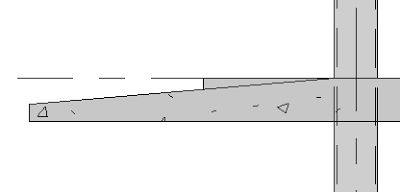


Slope a balcony properly with REVIT 2013 family 'void'.
If you've ever tried to propery slope a balcony in REVIT (as shown in the images posted) you know it's a challange and a very time consuming chore to attempt. Even with in place familes.
No no. This is an external rfa family file, and what an awesome familiy it is. Use this very same technique to do all kinds of things now.
See the CADclip video below for a demonstration.


Tuesday, January 22, 2013
REVIT Elevation from a Callout View
CADclips Announces New $39 and $99 REVIT Video Training Tutorial Subscriptions


Create 'Floor Plan' Callouts instead of 'Detail' Callouts.
If you plan on creating 'Elevation' views from within the Callout view, then make the callout view a Floor Plan or Structural Plan Type, not a 'Detail' Type.
See the CADclip below.
Thursday, December 20, 2012
Daryl and his Hero !

I was tickled to Cross Paths with my hero 'Eric Braeden' from Y & R (aka Victor Newman). The cute waitress at the airport bar let out a squeel, I grabbed my iPhone and seized the moment !
Wednesday, December 19, 2012
25% Off CADclips
CADclips Announces New $39 and $99 REVIT Video Training Tutorial Subscriptions
Take this 7 question survey to get 25% off any CADclips REVIT Training Product.
Monday, December 17, 2012
Save REVIT Screen Space
CADclips Announces New $39 and $99 REVIT Video Training Tutorial Subscriptions

Use 'Show Panel Titles' to save vertical screen space in REVIT by right clicking a Ribbon Tab, then the Show Panel Titles toggle.
Little as it may be, it's there to be used and .... IIIIIIIIIIIII use it.
REVIT Halftone Tip for Sketch Mode
CADclips Announces New $19, $39 and $99 REVIT Video Training Tutorial Subscription

The 'Halftone' setting controls how bright or faint the existing linework displays when you go into 'Sketch' mode in REVIT. You can find the 'Halftone' setting under the 'Manage' tab on the ribbon.
I definitely do recall being annoyed in the past when you go into sketch mode and you have the pink / magenta lines and the rest of the model all but disappears.
I believe it may also depend on your monitor, resolution, video card and display settings. By default it usually works ok so this is why most people never come across the problem.
But when you do . . . . . . it sure is annoying.
Wednesday, December 12, 2012
REVIT Training Video Using Detail Lines and Custom Line Style
CADclips Announces New $19, $39 and $99 REVIT Video Training Tutorial Subscription
Above is a nice little REVIT 2013 Training Video on using Detail Lines with a Custom Line Style to draw the dashed line representing a shelf for a closet.
Subscribe to:
Posts (Atom)